Reimagining Digital Inclusion: A Practical Guide to Community Tech Education
Introduction
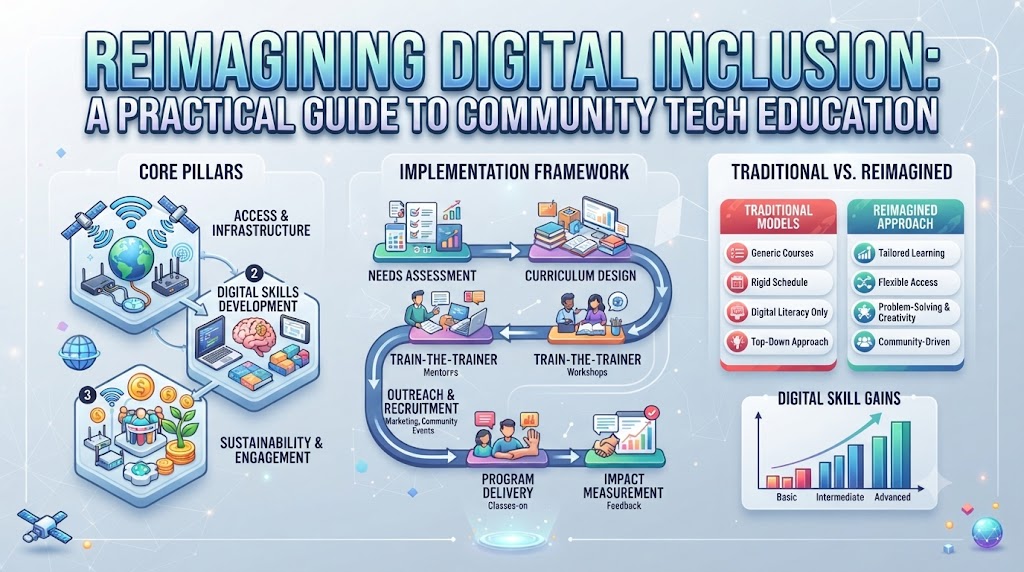
Consider what happens when essential public services, job boards, and educational platforms move entirely online. For millions of households, this shift creates an invisible wall. Owning a basic smartphone or sharing a single home computer does not automatically grant someone the ability to navigate a complex online portal, file an electronic tax form, or filter out dangerous web scams. True equity in the modern era requires moving past the simple hardware footprint to address a far more subtle challenge: operational confidence.Technology creates progress only when individuals possess the skills to harness it. Community-focused tech initiatives tackle this challenge head-on by translating intimidating technical concepts into daily practical habits. By prioritizing usable skills over complex theory, these programs ensure that digital expansion benefits every neighborhood rather than widening existing social divides.This guide explores the evolving landscape of technology education, the structural barriers communities face, and how non-profit partnerships create lasting pathways to self-reliance.
Defining Practical Digital Competency
Practical digital competency is the ability to confidently locate, process, utilize, and protect information using modern electronics. Rather than training software engineers, community-centered initiatives focus on functional fluency—the precise set of skills required to live, work, and learn in a connected environment.
True competency relies on three distinct layers of understanding:
- Hardware and Software Command: Comfortably operating physical devices, navigating operating systems, managing local and cloud file structures, and maintaining basic system health.
- Information Evaluation: Discerning credible sources from misleading content, understanding how search engines surface information, and critically assessing digital media.
- Security and Privacy Awareness: Recognizing deceptive digital patterns, safeguarding personal credentials, understanding data ownership, and managing personal privacy settings.
Organizations like Cotocus.org design instruction around these real-world demands, ensuring learners gain capabilities they can immediately apply in their daily lives.
The Socioeconomic Ripple Effect of Accessible Tech Education
When a community gains functional tech skills, the benefits extend far beyond individual screen use. Digital capability acts as a catalyst for local economic and social stability.
Unlocking Modern Employment Pathways
Virtually all contemporary employment sectors demand basic digital interactions. From logistics personnel managing digital manifests to administrative workers updating shared schedules, baseline comfort with technology is now a universal requirement. Developing these competencies opens doors to higher-wage positions and career mobility.
Strengthening Academic Equity
When parents and students master digital productivity tools together, educational support moves into the home. Students can complete complex research assignments, while parents can track academic progress, communicate with educators, and engage directly in their children’s learning journeys.
Fostering Equitable Civic Participation
As civic infrastructure, public health resources, and municipal services transition to digital-first formats, tech-fluent citizens remain informed and empowered. Functional literacy guarantees that vulnerable populations retain full access to community services, public hearings, and safety-net programs.
Identifying Key Participant Groups
Tech education frameworks yield the highest impact when tailored to the distinct goals of diverse community groups.
- Adult Learners and Job Seekers: Focus on office productivity suites, professional communication protocols, digital resume formatting, and online career platforms.
- Seniors and Older Adults: Emphasize video communication tools, secure online banking, patient portal navigation, and protective measures against consumer fraud.
- K-12 Students and Youth: Transition from passive content consumption to active creation, ethical digital citizenship, online safety, and introductory logic concepts.
- Community-Based Nonprofits: Focus on adopting secure cloud storage, streamlining administrative workflows, protecting donor data, and expanding service reach through digital channels.
- Local Entrepreneurs: Learn to manage digital storefronts, implement secure point-of-sale systems, and utilize basic online marketing to reach local customer bases.
Essential Modules of a Modern Training Framework
Effective instruction shuns abstract lecturing in favor of task-oriented, experiential learning. Core curricula generally incorporate five foundational modules.
1. Fundamentals of Device Operations
Demystifying physical hardware, touch interfaces, file organization, folder hierarchies, peripheral setup, and system troubleshooting.
2. Web Navigation and Critical Evaluation
Mastering web browsers, utilizing search operators effectively, identifying secure web protocols (HTTPS), and cross-referencing information to verify accuracy.
3. Workplace Productivity and Collaboration
Gaining proficiency with text documents, spreadsheets, shared online calendars, cloud storage systems, and remote video conferencing.
4. Defensive Digital Practices
Building strong authentication habits, recognizing phishing vectors, configuring multi-factor authentication, and identifying software update prompts.
5. Responsible Tech and AI Fundamentals
Introducing foundational concepts of how algorithms, online data collection, and emerging automated tools work, demystifying technology to help users make informed personal choices.
Overcoming Structural Obstacles to Inclusion
Launching impactful educational initiatives requires identifying and mitigating the hidden friction points that keep people from participating.
- Infrastructure and Device Deficits: Instruction must adapt to real-world hardware limits. Programs often incorporate refurbished hardware distribution or partner with local libraries to provide reliable device access outside class hours.
- Bandwidth Constraints: Curricula should remain functional in low-speed environments, emphasizing lightweight applications, offline-accessible tools, and downloadable learning references.
- Psychological Hesitation: Unfamiliarity with tech often creates a fear of breaking equipment or making costly errors. Empathetic, mentor-guided environments help reframe mistakes as normal steps in the learning process.
- Language and Physical Accessibility: Educational resources must accommodate diverse physical capabilities and native languages, leveraging screen readers, captioning tools, and translated instruction guides.
The Power of Strategic Community Coalitions
No single institution can eliminate the digital divide in isolation. Sustainable progress requires coordinated coalitions between community organizations, civic leaders, and mission-driven entities.
Organizations such as Cotocus.org serve as vital bridges within these ecosystems. By pairing structured instructional frameworks with local community access points, non-profits turn raw technology tools into genuine opportunities for progress.
Corporate Impact Partnerships
Corporate entities contribute vital resources—including retired hardware, enterprise software licenses, and dedicated grant funding. When channeled through dedicated non-profits, these contributions support long-term, community-rooted educational infrastructure rather than short-lived pilot projects.
Skills-Based Volunteering
Tech professionals offering their time as lab assistants, mentors, and curriculum advisors provide invaluable direct support. One-on-one guidance helps address individual learner bottlenecks that traditional group lectures might miss.
Measuring Impact Beyond Attendance Numbers
A program’s success cannot be measured solely by headcounts or seat completion rates. Genuine social impact evaluation tracks tangible life changes and behavioral shifts.
- Competency Demonstration: Utilizing practical performance evaluations—such as attaching a document, identifying a simulated phishing email, or creating a basic budget spreadsheet—to measure real skill retention.
- Economic Progression: Tracking post-program outcomes, including successful online job applications submitted, interviews secured, or employment advancements achieved.
- Autonomy Milestones: Measuring how comfortably participants handle personal tasks independently, such as refilling prescriptions via health portals or managing bank accounts without third-party intervention.
- Long-Term Program Sustainability: Evaluating whether community hubs maintain ongoing access, keep hardware operational, and foster peer-led learning groups over time.
Comparative Framework: Structuring Tech Education Programs
| Educational Pathway | Target Group | Primary Curricular Focus | Key Real-World Outcome |
| Essential Life Skills | Seniors, Beginners | Hardware basics, safe browsing, video calls, privacy tools | Independent management of daily online tasks and communications |
| Career Transformation | Unemployed, Career Changers | Document creation, spreadsheets, professional email, job portals | Readiness for entry-level administrative and customer service roles |
| Youth Empowerment | K-12 Students | Safe online behavior, research tools, introductory coding logic | Responsible digital habits and foundational STEM engagement |
| Organizational Uplift | Small Nonprofits | Cloud migration, cybersecurity basics, workflow automation | Improved operational efficiency and secure data management |
Strategic Guidelines for Launching Local Tech Programs
- Anchor Training in Local Needs: Conduct pre-program listening sessions to design coursework around the specific goals and everyday challenges of community members.
- Emphasize Hands-On Practice: Keep lecturing to a minimum. Structure every session around active, hands-on tasks so participants build confidence through doing.
- Maintain Low Student-to-Instructor Ratios: Use assistant instructors and skilled volunteers to ensure every learner receives timely, personal assistance when stuck.
- Teach Security as an Everyday Habit: Weave data privacy, scam awareness, and password hygiene into every module rather than treating security as a standalone, intimidating topic.
- Distribute Practical Take-Home Resources: Provide clear, jargon-free reference guides—both physical and offline-digital—so learners can review steps independently at home.
10 Frequently Asked Questions (FAQs)
1. How does digital competency differ from simply owning a computer?
Device ownership provides physical access, but competency provides the knowledge, critical thinking, and safety awareness required to use that device effectively for employment, education, and daily life.
2. Can individuals with zero prior experience learn modern tech skills?
Yes. Introductory programs start with fundamental physical mechanics—such as using a mouse or touchscreen—and build confidence step-by-step in a patient, low-stress environment.
3. Why is cybersecurity integrated into basic tech training?
New users are frequently targeted by online scams and identity theft. Teaching privacy safeguards and scam recognition from day one ensures learners stay safe while building their skills.
4. How do workforce development programs utilize tech education?
They focus on practical job-search tools: formatting resumes, navigating job portals, communicating professionally, and mastering workplace software like spreadsheets and video conferencing tools.
5. What is the role of technology non-profits in community development?
Non-profits like Cotocus.org identify local needs, design accessible learning pathways, mobilize resources, and work with local centers to deliver impactful, sustainable tech education.
6. How can local businesses support community technology programs?
Businesses can donate working hardware, sponsor training spaces, fund educational resources, or encourage employees to volunteer as instructors and mentors.
7. Is internet access strictly necessary for teaching tech skills?
While web navigation requires connectivity, many foundational concepts—such as word processing, file management, typing, and offline software navigation—can be taught without an active connection.
8. How do youth-focused tech programs encourage responsible habits?
They teach young people to evaluate online information critically, respect digital privacy, avoid cyberbullying, and use digital tools as creators rather than passive consumers.
9. What equipment is needed to set up a basic learning lab?
A basic lab requires reliable computers or tablets, basic peripherals, presentation tools for the instructor, accessible software applications, and clear learning guides.
10. How can tech professionals get involved in volunteer instruction?
Professionals can connect with local libraries, non-profits, or community centers to assist with workshops, mentor students, or help build easy-to-understand educational materials.
Conclusion
Functional tech literacy is an essential foundation for full participation in modern life. When communities lack access to practical technology education, the effects ripple through employment, education, healthcare access, and local economic resilience.By building structured, accessible, and human-centered training initiatives, non-profit organizations, educational institutions, and civic partners can systematically tear down these barriers. Equipping individuals with practical skills, defensive online habits, and digital confidence creates clear pathways toward personal autonomy and broader economic opportunity.Entities like Cotocus.org remain committed to advancing digital inclusion through education, collaboration, and community action. Supporting these initiatives—through volunteer engagement, strategic partnerships, or local advocacy—helps ensure technology fulfills its potential as an engine for widespread, meaningful progress.
Leave a Reply