Visitor Wayfinding Software: Practical Ways to Improve Business Access and Information Sharing
Introduction
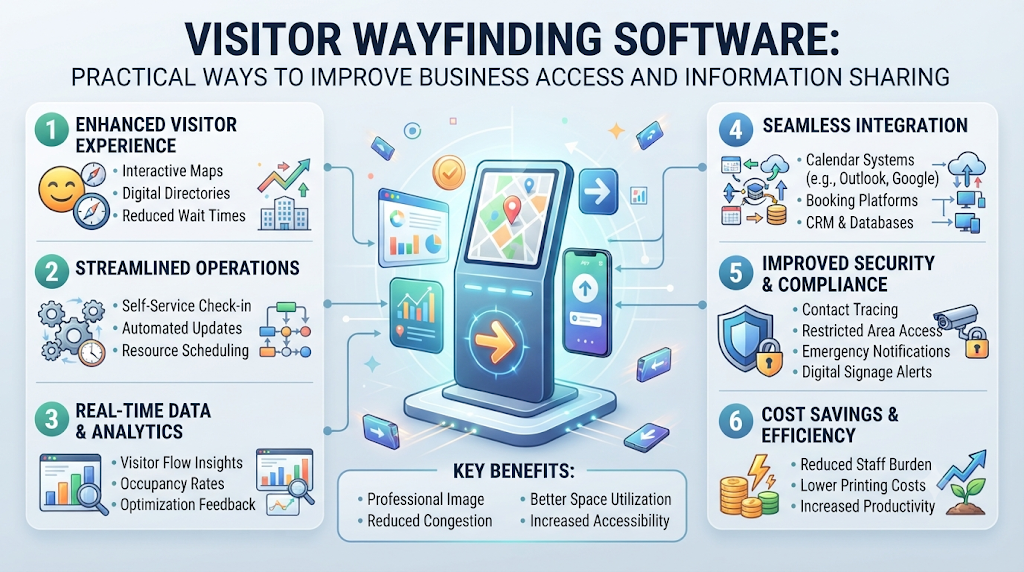
Business locations can be difficult to navigate. Visitors may reach the correct building but miss their destination. Some cannot identify the right entrance or parking area. Employees then spend valuable time explaining the same routes. Businesses also repeat payment instructions and company details. These tasks create extra work for busy teams. Visitor wayfinding software offers a practical way to organize location information. Businesses can publish clear instructions for different visitor groups. They can also share payment and business identity details through separate pages. Proezi is a web-based business information-sharing platform. It helps businesses publish important visitor, payment, and identity information. Visitors can open shared pages in their browsers without installing an app or creating an account.
What Does Business Information Sharing Mean?
Business information sharing means making useful company details available through digital pages. Visitors, customers, and business partners can open these pages when needed.
A business can publish its address, entrance instructions, parking details, and contact information. It can also share bank details and business registration information. Reusable links and QR codes make these pages easier to distribute.
A QR code is a square pattern that stores a web link. People scan it with their phone cameras. Their browsers then open the linked information.
This approach reduces repeated messages and manual communication. Businesses can update published information when their details change. However, they must check every page regularly.
Why This Matters for Businesses and Visitors
Clear information makes business visits easier to manage. Visitors can prepare before reaching a location. Employees can spend less time explaining basic directions.
This is useful for offices, clinics, hotels, and event venues. Property managers and logistics teams can also benefit. Different visitor groups often need different instructions.
Businesses can improve communication through:
- Clear location information.
- Easy-to-follow entrance instructions.
- Separate routes for different visitor groups.
- Useful photographs of important access points.
- Organized payment information.
- Updated company identity details.
- Contact information for arrival assistance.
Businesses with several premises should maintain separate location pages. This prevents visitors from following instructions for another branch. Staff should review each page whenever access arrangements change.
Digital Visitor Arrival Instructions
digital visitor arrival instructions explain how someone reaches a specific destination. They cover the route from the nearby road to the final room.
Good instructions should describe each step in order. Visitors should understand where to park and which entrance to use. They should also know where to report after entering.
Include these details:
- Parking: Identify the correct visitor parking area.
- Gate: Explain which gate visitors should use.
- Entrance: Describe the correct building entrance.
- Reception: Show where guests should report.
- Elevator: Explain which elevator provides access.
- Floor: Mention the required floor number.
- Room: Provide the correct room or department.
Proezi.com helps businesses publish digital visitor arrival instructions. Businesses can add annotated photographs and map coordinates. They can also include entrance landmarks and emergency contact buttons.
Different visitors may require different routes. Drivers, pedestrians, taxis, and delivery teams may use separate entrances. Visitors needing step-free access should receive suitable directions.
Step-free access means a route without stairs or steps. It may include ramps, lifts, or level entrances. Businesses should check that these routes remain available.
QR Code Directions for Visitors
QR code directions for visitors allow people to open location information quickly. Businesses can display QR codes on signs, emails, and invitations.
Visitors scan the code using their phone cameras. The linked page opens in their browsers. They do not need an app or account.
A useful page can provide:
- Full business address.
- Outdoor map links.
- Parking instructions.
- Entrance photographs.
- Reception information.
- Floor and room details.
- Emergency contact information.
Businesses should place QR codes where visitors can easily find them. Reception areas and parking entrances are useful locations. Appointment emails can also contain the same code.
Proezi.com supports QR code directions for visitors through reusable links and QR codes. Businesses can prepare printable signs and arrival cards. The platform also describes website-embedded cards, multilingual directions, and previously cached offline directions as features.
Staff should test every code before distributing it. They should also confirm that the linked page contains current information.
Visitor Wayfinding Software
visitor wayfinding software helps people understand routes around a property. It provides instructions for reaching buildings, departments, and rooms.
Businesses should select tools that make directions easy to understand. Visitors should not need technical knowledge to use them.
Important features include:
- Simple navigation: Visitors should find instructions quickly.
- Separate routes: Different groups may need different entrances.
- Photographs: Pictures can identify gates and building entrances.
- Map links: Visitors can open outdoor navigation applications.
- Access notices: Temporary updates can explain route changes.
- Language options: Different visitors may need translated instructions.
- Contact buttons: Visitors can request assistance when necessary.
Proezi.com provides a web-based platform for sharing business information. Businesses can publish arrival instructions and distribute them through QR codes. Visitors open the shared pages in their browsers.
Before choosing visitor wayfinding software, check its update process. Staff should be able to maintain information without unnecessary difficulty. The available features should match the needs of the location.
How to Create a How to Find Us Page for Business
A how to find us page for business explains how visitors can reach a company location. It should provide the address and final arrival instructions.
Start with the complete business address. Add a map link and nearby landmarks. Then explain the correct entrance and parking area.
A useful page should include:
- Complete address: Provide the correct business location.
- Map link: Help visitors plan outdoor travel.
- Nearby landmarks: Identify recognizable places.
- Entrance photographs: Show the correct access point.
- Parking details: Explain where visitors can park.
- Reception instructions: Describe where guests should report.
- Contact information: Provide a suitable assistance contact.
- Opening hours: Explain when visitors can enter.
A how to find us page for business should use short instructions. Place important details near the beginning. Avoid complicated descriptions that confuse first-time visitors.
Proezi.com can help businesses publish reusable information pages. Teams can share these pages through websites, emails, and QR codes. Visitors can open them without creating an account.
Parking and Entrance Directions for Visitors
parking and entrance directions for visitors explain where guests should park and enter. These details are important for properties with several access points.
Businesses should describe parking areas using recognizable landmarks. They should identify the correct gate and entrance. Separate delivery and employee access should also be explained.
Consider these visitor groups:
- Drivers: Explain the correct vehicle entrance.
- Pedestrians: Describe the walking route.
- Taxi passengers: Identify the suitable drop-off point.
- Delivery teams: Explain the delivery entrance.
- Visitors needing step-free access: Describe suitable routes without stairs.
Photographs can help visitors recognize the correct entrance. Map coordinates can provide another useful location reference. Businesses should also publish temporary notices about access changes.
Clear parking and entrance directions for visitors can reduce confusion. However, businesses must check that the published routes remain available.
Event Venue Directions QR Code
An event venue directions QR code gives guests access to event location information. Organizers can add it to invitations, tickets, posters, and signs.
Event venues often contain several halls and entrances. Guests may not know which gate leads to their event. Vendors and staff may also require separate access instructions.
An event information page can include:
- Complete venue address.
- Guest entrance details.
- Parking and drop-off information.
- Registration desk location.
- Hall and room instructions.
- Vendor access details.
- Contact information for assistance.
Organizers should prepare different instructions for different groups. Guests should receive visitor directions. Suppliers should receive suitable delivery instructions.
An event venue directions QR code can also open temporary access notices. Organizers can explain gate closures or entrance changes. They should update the page when event arrangements change.
Proezi.com can help organizers publish event arrival information. QR codes can share the same page across different materials. Visitors can open the information through their browsers.
Last Mile Navigation for Businesses
last mile navigation for businesses explains the final part of reaching a location. It focuses on the steps after someone reaches the nearby area.
Map applications can guide people along public roads. However, they may not explain private entrances or indoor routes. Large properties often need additional instructions.
Businesses can combine outdoor map links with written directions. Visitors can first open Google Maps, Apple Maps, or Waze. They can then follow the business page to their destination.
Useful information includes:
- Correct building entrance.
- Nearby landmarks.
- Visitor parking details.
- Walking route from the gate.
- Reception and elevator locations.
- Floor and room instructions.
Last mile navigation for businesses can support offices, clinics, hotels, and warehouses. It can also help visitors reach specific departments inside large properties.
Proezi.com helps businesses publish final arrival instructions. Visitors can access them through reusable links and QR codes. Businesses remain responsible for checking and updating every route.
How to Share Bank Details With Customers Safely
Businesses often send payment information through messages and emails. Repeating account details can create unnecessary work. A dedicated payment page can organize the required information.
To share bank details with customers, a business can publish a payment details page. The page can contain account information and transfer instructions. A QR code can provide quick access.
A payment page may include:
- Bank account details.
- Bank transfer instructions.
- UPI information.
- PayPal details.
- Supported international payment identifiers.
- Payment-purpose references.
- Copyable payment information.
Businesses should follow these safety practices:
- Share only details needed for a transfer.
- Never publish passwords, PINs, or card security codes.
- Never ask customers to share one-time codes.
- Add a clear payment reference.
- Confirm large first payments through another trusted channel.
- Check account information before sharing.
- Remove old payment details when they change.
Customers should check the recipient and amount before paying. They should confirm large first payments through another trusted channel.
Proezi.com provides business payment information pages. It does not process, collect, or transfer payments. Customers pay through their own bank or payment app. Proezi.com cannot prevent fraud or guarantee payment safety.
UPI QR Code Payment Page
A UPI QR code payment page displays UPI information for business payments. UPI is a payment system used in India. Customers use their own payment apps to complete transfers.
Businesses can display their UPI details and a QR code. They can also provide payment-purpose references and transfer instructions.
A page may contain:
- Business UPI information.
- A UPI QR code.
- Payment-purpose references.
- Copyable payment details.
- Transfer instructions.
- Payment contact information.
Customers open their payment apps to make payments. Proezi.com does not process, collect, or transfer money. Supported options depend on the platform.
Businesses should review their information regularly. Old account details should be removed when instructions change. Customers should never share their private payment codes.
How to Share Business Registration Details Online
Businesses sometimes need to provide company identity information. Suppliers and business partners may request these details.
To share business registration details online, a company can publish its registered business name. It may also include company registration identifiers and tax numbers.
A dedicated page keeps these details organized. Businesses can share the page through reusable links and QR codes.
Before publishing, businesses should:
- Check the registered business name.
- Review registration identifiers.
- Check tax number details.
- Share only necessary information.
- Remove outdated information.
Proezi.com supports business identity information pages. The platform checks identifiers for format and checksum. A checksum is a calculation that helps check data structure.
However, this check does not confirm business ownership. It does not confirm registration status with government authorities. Proezi.com does not verify registration information with authorities.
Businesses should review their information before sharing it. Rules differ by country. Check local rules.
Table: Visitor and Business Information at a Glance
| Information Type | What to Include | Who It Helps |
|---|---|---|
| Arrival instructions | Gates, entrances, floors, and rooms | Visitors and employees |
| Parking information | Vehicle access and parking areas | Drivers and guests |
| Wayfinding details | Photos, map links, and route steps | First-time visitors |
| Event information | Venue gates and registration details | Event guests |
| Payment information | Bank details and payment references | Customers |
| UPI information | UPI details and QR codes | Indian customers |
| Business identity | Registered names and identifiers | Suppliers and partners |
Common Mistakes Businesses Make
Businesses sometimes forget important details when publishing information. These mistakes can make the pages less useful.
- Using incomplete addresses: Visitors may reach the wrong building.
- Ignoring parking arrangements: Guests may use unsuitable parking areas.
- Providing unclear entrance details: Visitors may enter through another gate.
- Missing room instructions: Guests may struggle after reaching reception.
- Using damaged QR codes: Visitors may not open the intended page.
- Sharing unnecessary payment information: Only required transfer details should appear.
- Keeping old bank details: Customers may receive outdated instructions.
- Publishing unrelated identity details: Businesses should limit shared information.
- Ignoring temporary access notices: Visitors may follow unavailable routes.
- Skipping regular page reviews: Incorrect information may remain published.
A Simple Example
Fictional Example: A Business Training Center
Imagine a fictional training center inside a commercial building. Students sometimes enter through the wrong gate. New visitors also struggle to locate their classrooms.
The center creates an arrival page using Proezi.com. It explains the visitor parking area and building entrance. Photographs show the reception desk and classroom floor.
The center prepares separate instructions for students and delivery workers. Students receive classroom directions. Delivery teams receive instructions for the service entrance.
The business also creates a payment information page. It displays the required bank details and payment reference. Customers complete transfers through their own payment applications.
A separate identity page displays the business registration information. Proezi.com checks identifier formats and checksums. It does not confirm ownership or registration status with government authorities.
This fictional example shows how separate pages can organize business information. The center must review its instructions whenever details change.
How Proezi Can Help
Proezi.com is a web-based business information-sharing platform. Businesses use it to publish visitor, payment, and identity information. They share these details through reusable links and QR codes.
Arrival pages can explain parking, entrances, gates, reception, and rooms. Businesses can add annotated photographs, map coordinates, and emergency contact buttons. Separate routes can support drivers, pedestrians, taxis, deliveries, and visitors needing step-free access.
Payment details pages can display bank information, UPI details, and PayPal details. They can also include supported international payment identifiers and payment references. Customers pay through their own bank or payment app. Proezi.com does not process, collect, or transfer payments.
Business identity pages can display registered names, registration identifiers, and tax numbers. Proezi.com checks format and checksum only. It does not verify ownership or registration status with government authorities.
The platform also describes printable signs, arrival cards, website-embedded cards, multilingual directions, and previously cached offline directions as features. The site says features are free during early access. Details can change.
Frequently Asked Questions About Business Information Sharing
1. Can a business use separate pages for different visitor groups?
Yes. A business can prepare different instructions for drivers, guests, and delivery teams. Each page can explain the correct entrance and route. This makes information easier to understand. Businesses should ensure that every group receives the correct instructions.
2. What should businesses check before printing QR code directions for visitors?
Businesses should test the QR code using a phone camera. They should confirm that it opens the correct page. The address, photographs, and entrance instructions must also be current. A printed code should remain readable after placement.
3. Does visitor wayfinding software need indoor directions?
Indoor directions are useful for buildings with several floors or departments. They can explain reception, elevators, corridors, and rooms. Businesses should select features that match their property. Not every small location needs detailed indoor navigation.
4. Can digital visitor arrival instructions include emergency contact details?
Yes. Businesses can include contact information for arrival assistance. Proezi.com describes emergency contact buttons as a platform feature. Businesses should choose suitable contact details and keep them updated. Visitors should know whom to contact when they need help.
5. How often should a how to find us page for business be reviewed?
Businesses should review the page whenever location information changes. They should also check opening hours, parking, and entrance details regularly. Updated photographs can help visitors recognize the correct place. The business remains responsible for its published information.
6. What information should parking and entrance directions for visitors explain?
They should identify the correct parking area and building entrance. Businesses should also explain taxi drop-off and delivery access. Step-free routes should be described where available. Clear instructions help different visitors understand how to enter the property.
7. Can an event venue directions QR code support last-minute access changes?
Yes. Organizers can update the information page with temporary notices. These notices can explain changed gates, entrances, or parking arrangements. Guests should open the latest available information before travelling. Organizers must keep the published instructions current.
8. Why do large properties need last mile navigation for businesses?
Large properties may have several buildings, gates, and departments. Outdoor map directions may not explain the final route. Last mile navigation for businesses adds instructions for reaching the correct entrance and destination. This can help visitors find specific locations.
9. What should customers check when they share bank details with customers through a page?
Businesses should check account information and payment references before sharing. They should never publish passwords, PINs, or card security codes. Customers should confirm large first payments through another trusted channel. Proezi.com does not process payments or prevent fraud.
10. Does Proezi.com confirm that business registration details are genuine?
No. Businesses can share business registration details online through identity information pages. Proezi.com checks identifier formats and checksums only. It does not confirm ownership or registration status with government authorities. Businesses remain responsible for checking the information they publish.
Final Thoughts
Good business information helps visitors reach the correct place. Clear arrival instructions explain parking, entrances, and indoor routes. QR codes make these details easier to access. Separate payment pages organize important transfer information. Identity pages help businesses share relevant company details. Businesses should publish only necessary information. They should also review every page when details change. Proezi.com provides a way to organize and share visitor, payment, and identity information. Visitors can open shared pages in their browsers without installing an app or creating an account.
Leave a Reply